
Download RubyGPT – AI Writing Assistant, Free, Secure & Easy to Use
Overview
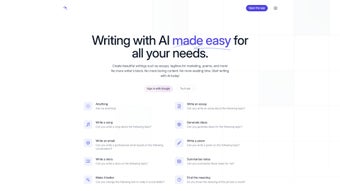
RubyGPT is a cloud‑based AI writing assistant that aims to simplify every stage of content creation. Whether you are drafting a marketing tagline, composing a professional email, writing a poem, or summarizing a lengthy research note, RubyGPT leverages the latest large‑language‑model technology to turn vague ideas into polished text in seconds. The platform is built for writers who struggle with writer’s block, need quick inspiration, or simply want to boost the quality of their output without spending hours on revisions. RubyGPT’s intuitive web interface requires no technical expertise; you type a prompt, select a tone or style, and the AI returns multiple options that you can edit, combine, or export directly. While it does not yet support offline operation or multilingual output, the tool’s core strength lies in its versatility and the ability to explain complex concepts in plain language, making it a valuable companion for students, marketers, authors, and anyone who writes for a living.
The service operates on a subscription model with a free tier that allows a limited number of generations per month, giving users a risk‑free way to test the engine before committing. Security is a priority: all data is encrypted in transit, and the platform complies with GDPR standards, ensuring that your drafts and personal information stay private. Regular updates add new prompt templates, improve language fluency, and refine the summarization algorithm, so the tool continues to evolve alongside the needs of modern writers.
Key Features and Easy Installation
Feature Highlights
- Essay & article generation – produce structured drafts with headings, introductions, and conclusions.
- Marketing copy wizard – create taglines, product descriptions, and ad headlines in seconds.
- Creative writing suite – write poems, short stories, or dialogue with style presets.
- Smart summarizer – condense notes, research papers, or meeting minutes into clear bullet points.
- Text enhancer – improve grammar, readability, and tone while preserving original intent.
- Idea explainer – break down complex topics into simple, easy‑to‑understand explanations.
- Email composer – draft professional outreach, follow‑ups, and customer support messages.
- Prompt library – access pre‑built templates for common writing tasks, saving time on setup.
Installation & First‑Time Use
Getting started with RubyGPT is straightforward because it runs entirely in the browser. Follow these three steps to begin generating content:
- Visit the official website at ruby-gpt.com and click the “Sign Up” button. You can register using an email address or a Google account for quick access.
- Choose a plan. The free tier grants up to 20 generations per month, which is sufficient for casual users. If you need higher limits, the Pro plan offers 500 generations plus priority support for a monthly fee.
- Start writing. After logging in, select a template from the dashboard, type your prompt, and hit “Generate”. The AI will return several variations within seconds. You can edit directly in the editor, copy to clipboard, or download as a .txt or .docx file.
Because RubyGPT is a SaaS solution, there is no need to install software on Windows, macOS, Android, or iOS devices. The platform is optimized for modern browsers (Chrome, Edge, Safari, Firefox) and automatically scales to mobile screens, allowing you to write on the go. For power users, a browser extension is available for Chrome and Edge, giving instant access to the AI from any web‑based text field (e.g., Google Docs, Gmail, or WordPress).
Compatibility, Pros, and Cons
RubyGPT runs on any operating system that supports a recent web browser, including Windows 10/11, macOS 10.15+, Linux distributions, Android 8+, and iOS 13+. The responsive design ensures that the UI feels native on both desktop and mobile devices, and the Chrome/Edge extension works across Windows and macOS environments.
Pros
- Versatile writing modes – from academic essays to creative poetry, all in one place.
- Instant summarization – reduces long documents to concise points without losing key information.
- User‑friendly interface – no steep learning curve; suitable for beginners and seasoned writers alike.
- Secure cloud processing – encrypted connections and GDPR compliance protect user data.
- Free tier available – lets users test core functionality before purchasing.
Cons
- Lacks offline mode – requires an internet connection for every generation.
- No built‑in multilingual support – currently limited to English language output.
- Advanced features (e.g., bulk generation, API access) are locked behind the paid plan.
- Dependence on third‑party LLM providers may cause occasional latency spikes.
Real‑World Performance
In daily use, RubyGPT delivers content that is grammatically sound and contextually relevant. The AI’s ability to adapt tone (formal, casual, persuasive) helps users maintain brand voice across marketing materials. While the summarizer excels with structured documents, it may need a manual tweak when handling heavily formatted PDFs. Users report that the Chrome extension dramatically speeds up workflow, especially when drafting emails directly within Gmail. Overall, the tool strikes a balance between speed and quality, making it a reliable sidekick for most writing tasks.
FAQ and Final Verdict
Is RubyGPT really free to use?
Yes, RubyGPT offers a free tier that allows up to 20 content generations per month. This is enough for occasional users or to test the platform before upgrading to a paid subscription.
Can I use RubyGPT on my mobile device?
Absolutely. The web app is fully responsive, and a dedicated Chrome/Edge extension works on Android and iOS browsers, letting you generate text from smartphones and tablets.
How secure is my data when I generate content?
All data is transmitted over HTTPS and stored temporarily for processing only. RubyGPT complies with GDPR, and no personal drafts are kept after the session ends unless you explicitly save them to your account.
Does RubyGPT support languages other than English?
Currently, RubyGPT is optimized for English only. Multilingual support is on the roadmap, but there is no official timeline yet.
What happens if I exceed the free generation limit?
When you hit the limit, the platform prompts you to upgrade to the Pro plan or wait until the next billing cycle when the quota resets.
Conclusion – Should You Download RubyGPT?
RubyGPT positions itself as a solid, all‑in‑one AI writing assistant that covers the most common content‑creation scenarios. Its cloud‑native design, clean UI, and secure processing make it a trustworthy choice for freelancers, marketers, and students alike. While the lack of offline mode and multilingual capability may be a drawback for some power users, the free tier and browser‑based accessibility offset those limitations for the majority of writers. If you frequently battle writer’s block, need quick tagline ideas, or want a reliable summarizer for research notes, RubyGPT offers a compelling solution that’s just a click away.
Ready to boost your productivity? Download RubyGPT now, start your free trial, and experience AI‑enhanced writing without the hassle of installations or complex setups.



.png)



